Disco Draws

What drawing is hiding in the disc?

Kids spin the disc, color the openings for each number, then lift it to find out. 100 surprises, on screen or on real paper.

Coming soon to theApp StoreComing soon toGoogle Play

Ages 3 and up · iPhone, iPad and Android · In English and Brazilian Portuguese

1234

How the game works

Three moves and a mystery in every disc.

  1. Spin

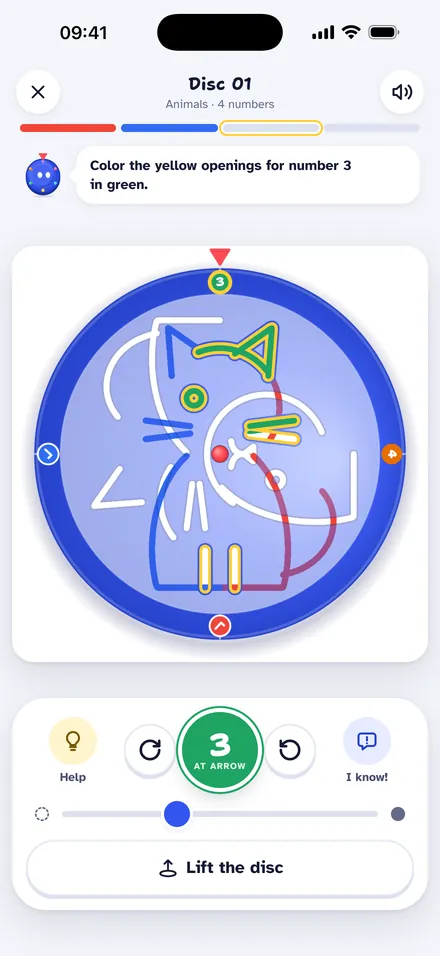
    Spin the disc until the number reaches the red arrow.

  2. Color

    Color the yellow openings with that number's color. Every number plays a note.

  3. Lift

    Lift the disc and discover the drawing. It comes to life, and the disc turns into a tune.

  1. 1

    Number 1

  2. 12

    Numbers 1 and 2

  3. 1234

    All numbers

  4. It's a cat!

Think you already know what it is? Take a guess with I know! before finishing.

On screen or on real paper

The same game, the way your child prefers.

The disc screen in the app, with number 3 at the arrow and yellow openings to color

On screen

Color with a finger or, on iPad, with Apple Pencil. Then paint the drawing with bucket, brush, rainbow, glitter and stamps.

  • Bucket
  • Brush
  • Rainbow
  • Glitter
  • Stamps

the drawing stays on paper

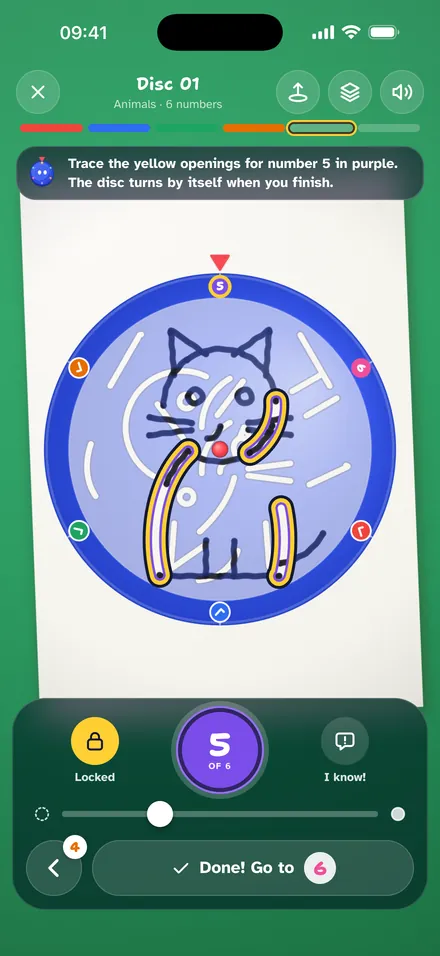
The phone camera shows the disc over the sheet while the child traces number 5 with a marker

the camera sees the sheet

On paper

With the phone propped about 30 cm (12 in) above a sheet of paper, the camera shows the disc on top of the paper and kids draw with real markers. Number by number, the drawing appears on the sheet.

What you need: a white sheet, a dark marker, good light and a cup or a stack of books to prop up the phone.

On paper, kids can also write the word, with the camera following each letter.

What kids practice while they play

Each part of the game trains something different.

  • Focus and numbers

    Turning until each number reaches the arrow trains focus and number order.

  • Fine motor skills

    Drawing on paper along the openings trains pencil grip, pressure and line control.

  • Writing

    After the reveal, kids write the drawing's name, with a dot that shows where each letter starts.

  • Two languages

    The app comes in English and Brazilian Portuguese. In Portuguese, kids can also hear and write each drawing's name in English.

  • Creativity

    Kids draw, photograph a paper drawing or ask Disco for one, and it all becomes a disc for someone else to discover.

  • For kids who can't read yet

    Colors and numbers guide the game, and Disco reads the instructions out loud, in the app's language.

Writing

Found the cat? Write CAT

After the reveal, kids write the drawing's name, on screen or on paper. A dot shows where to start and the path of each stroke.

  1. 1
    First letter

    Start by tracing just the first letter.

  2. 2
    With a path

    The whole word, with the path of each letter.

  3. 3
    No path

    The word with no guide, for kids who already write.

The level of help comes from the child's age, and a grown-up can change it in the Parents area.

Also in Portuguese: in the Brazilian Portuguese version, kids write GATO and, with English turned on, CAT right after.
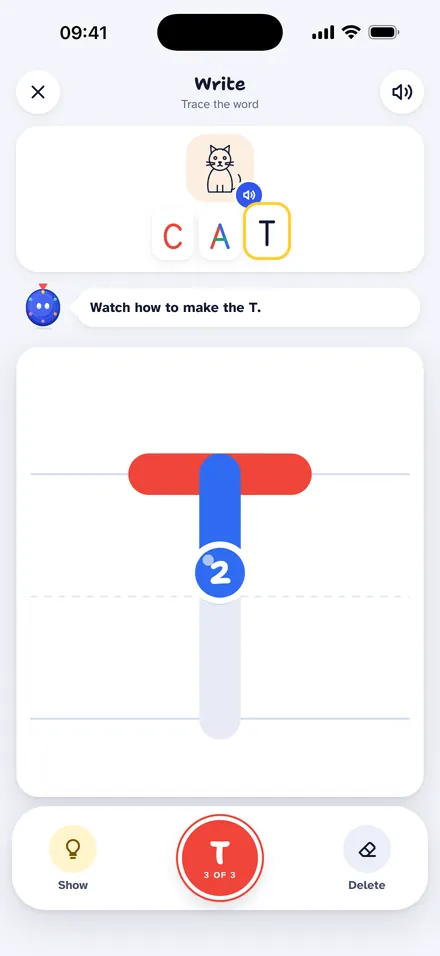
The writing screen: the child traces the letter T of CAT following the dot
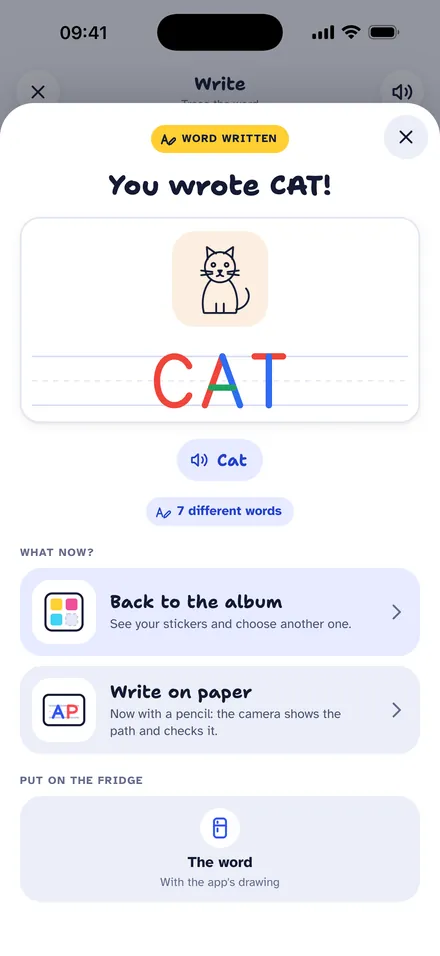
The "You wrote CAT!" screen, with the cat and the word
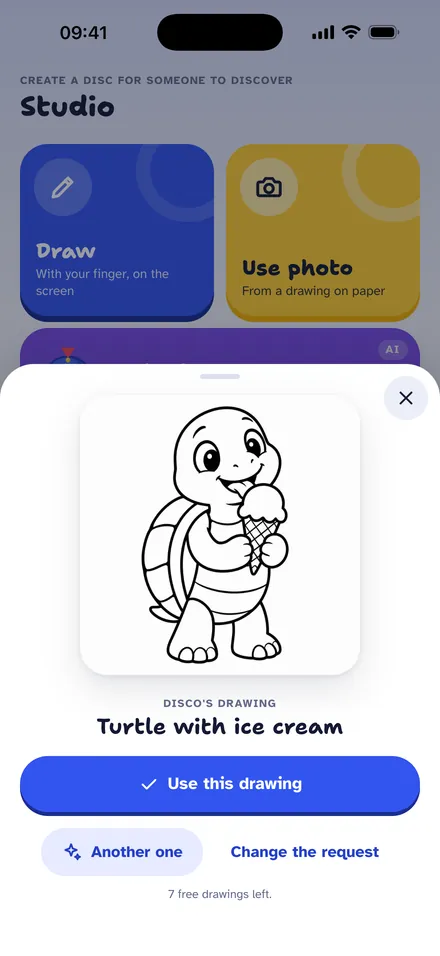
Ask Disco: the idea "turtle eating ice cream" became a line drawing

Studio

Kids imagine, Disco draws

In the Studio, kids make their own discs. Everything becomes a surprise disc for someone else to discover.

  • DrawWith a finger, on screen.
  • Use photoOf a drawing made on paper.
  • Ask DiscoKids ask, artificial intelligence draws.

Ask Disco, with care

  • It works only after a grown-up turns it on, and it can be turned off anytime in the Parents area.
  • At every age, it refuses weapons (toy ones too), fights, scary things, adult content, brands and famous people. Every drawing goes through a filter before it appears.
  • Requests go out with no name, photo or device identifier.
  • 10 Disco drawings to try; with the Full Plan, 50 a month.

10 worlds, 100 surprises

The trail starts easy and grows with your child: 4 phases, from Animals to Tech and games. Discs start with 4 numbers and go up to 12.

  1. Phase 1

    • Animals10 drawings
    • Home and garden10 drawings
    • Under the sea10 drawings
  2. Phase 2

    • Jobs10 drawings
    • Transport10 drawings
    • Dinosaurs10 drawings
  3. Phase 3

    • Brazilian folklore10 drawings
    • Around Brazil10 drawings
  4. Phase 4

    • Sports and music10 drawings
    • Tech and games10 drawings

Special trail

Night in space

With the Full Plan, a new trail every month. The first one has neon discs: every discovery lights up a star.

Some of the hidden drawings

  • Cat
  • Whale
  • Rocket
  • Owl
  • Turtle
  • Butterfly
  • Saci
  • Christ the Redeemer
  • T. rex
  • Ladybug
  • Robot
  • House

Fridge and album

Every masterpiece goes on the fridge

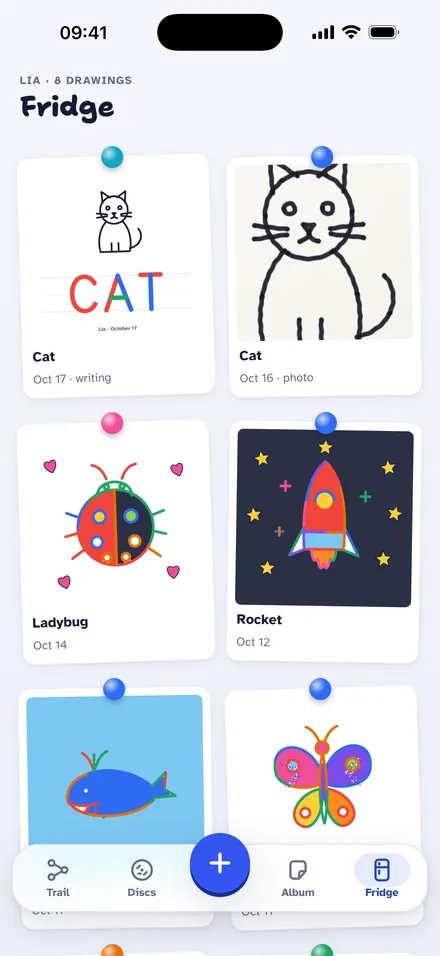
The fridge keeps each child's painted drawings and paper photos, ready to show the grandparents.

  • Fridge

    Painted drawings and photos of the paper.

  • Sticker album

    Every drawing discovered becomes a sticker.

  • Crowns and chests

    Three crowns per drawing and a chest at the end of each world.

  • Weekly surprise

    A special drawing every week.

The app's fridge with painted drawings and photos of paper drawings

For parents

Made for kids, designed for parents

Everything for grown-ups sits behind a grown-up check, and the Parents area keeps every choice at hand.

  • No ads, no accounts

    No advertising, sign-up or login. Kids never see offers.

  • Grown-up check

    Purchases, links, settings and sharing ask for a multiplication or the parent code.

  • Screen time

    Each child's time and an optional daily limit. Kids can see how much time is left.

  • Purchase lock

    One switch blocks every purchase inside the app.

  • Data on the device

    Profiles and drawings stay on the device. Usage statistics only with a grown-up's permission, and anonymous.

  • Works offline

    Everything works offline, except Disco drawings and purchases.
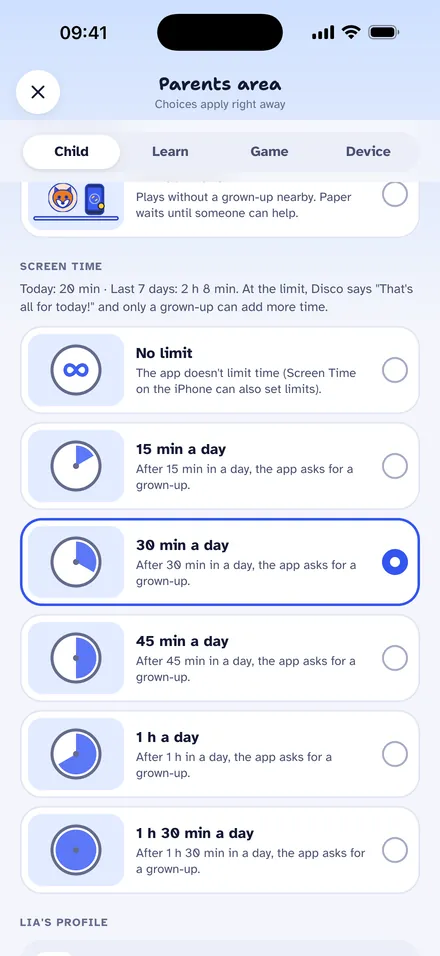
The Parents area: today's screen time and the daily limit options

Read the privacy policy

Start for free. Go further with the Full Plan.

Free

To get to know it and play every day.

  • 5 new drawings a day for each child
  • The trail in order, world by world
  • 10 Disco drawings to try
  • No limit on replays, crowns, painting, writing, letters, the Studio and the weekly surprise

Monthly or yearly, with a 7-day free trial

Full Plan

For kids who don't want to wait.

  • Unlimited new drawings every day
  • Every world, in any order
  • A new special trail every month
  • 50 Disco drawings a month
  • Covers every child on the device

Disco drawing packs: 20 or 50 drawings that never expire.

Prices are shown in the store, in your currency, before you confirm. Purchases sit behind the grown-up check and go through the App Store or Google Play. The subscription renews automatically until cancelled in the store settings (on the App Store, at least 24 hours before the end of the period).

Frequently asked questions

What ages is it for?

Ages 3 and up. At setup, a grown-up enters the child's age, whether they read and what they'll practice (writing, fine motor skills or creativity, plus English in the Portuguese version). The app then adjusts the writing help, the voice that reads instructions and the style of Disco's drawings. The trail starts easy for everyone and grows little by little.

Are there ads? Do I need an account?

No and no. Disco Draws has no ads, sign-up or login.

How does "On paper" mode work?

Prop the phone on a cup or a stack of books, about 30 cm (12 in) above a white sheet, with the back camera facing down. The screen shows the disc over the sheet: line it up with two fingers and tap Lock. Kids trace the current openings with a marker and, when the camera sees the number traced, the disc turns to the next one by itself (you can also move on with the button). At the end, the drawing is on the paper.

Is it safe for kids?

It works only after a grown-up turns it on, through the grown-up check, and it can be turned off anytime in Parents area › Learn › Ask Disco (AI). At every age, Disco refuses weapons (toy and pretend ones too), fights, scary things, blood, death, adult content, drugs, bad words, brands and famous people, and every drawing goes through a filter before it appears. Before sending, the app also refuses requests with personal data such as names, addresses, schools and contact details, and the server checks again. In the United States, kids under 13 only choose from the app's ideas; typing a request is for a grown-up, after the grown-up check.

What is free?

Downloading and playing: 5 new drawings a day for each child, with the trail in order, and 10 Disco drawings to try. Replays, crowns, painting, writing, letters, the Studio and the weekly surprise have no limit.

See all questions

Disco is already spinning

Coming soon to the App Store and Google Play.

Coming soon to theApp StoreComing soon toGoogle Play

Questions, ideas or partnerships: contato@discodraws.com